

Open your own account and try it free for 14 days
Do you want to send documents for signature yourself, and your company does not use actaSIGN yet? Then create your own account for your organization. The first 14 days are free. To start the trial you choose a plan and add a card in Stripe; nothing is charged for this. You become the owner and administrator of the account.
1. Start creating the account
Section titled “1. Start creating the account”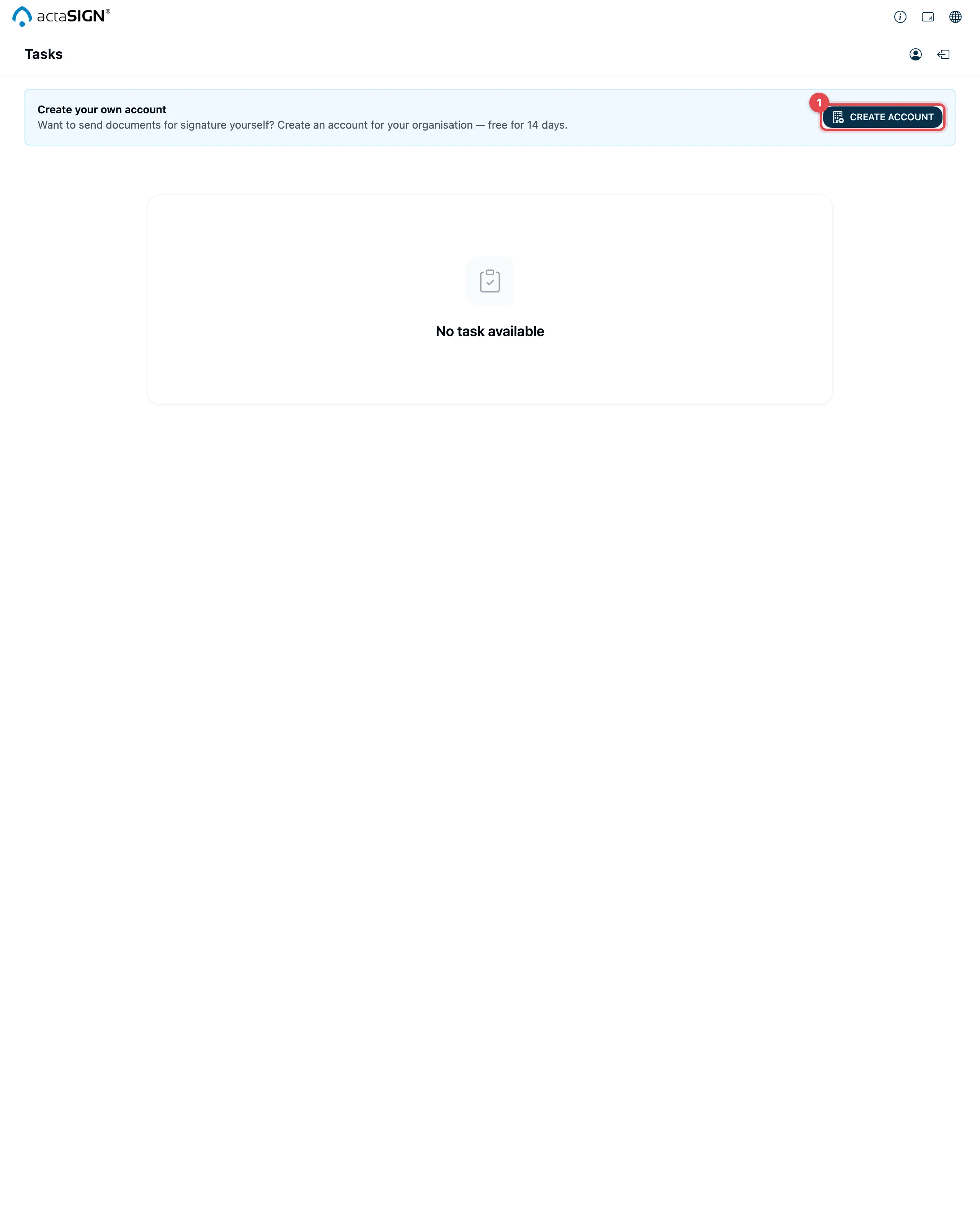
Sign in. Without an organization you only see your Tasks, with the notice Create your own account above them. Click Create account there (1).
2. Details about the organization
Section titled “2. Details about the organization”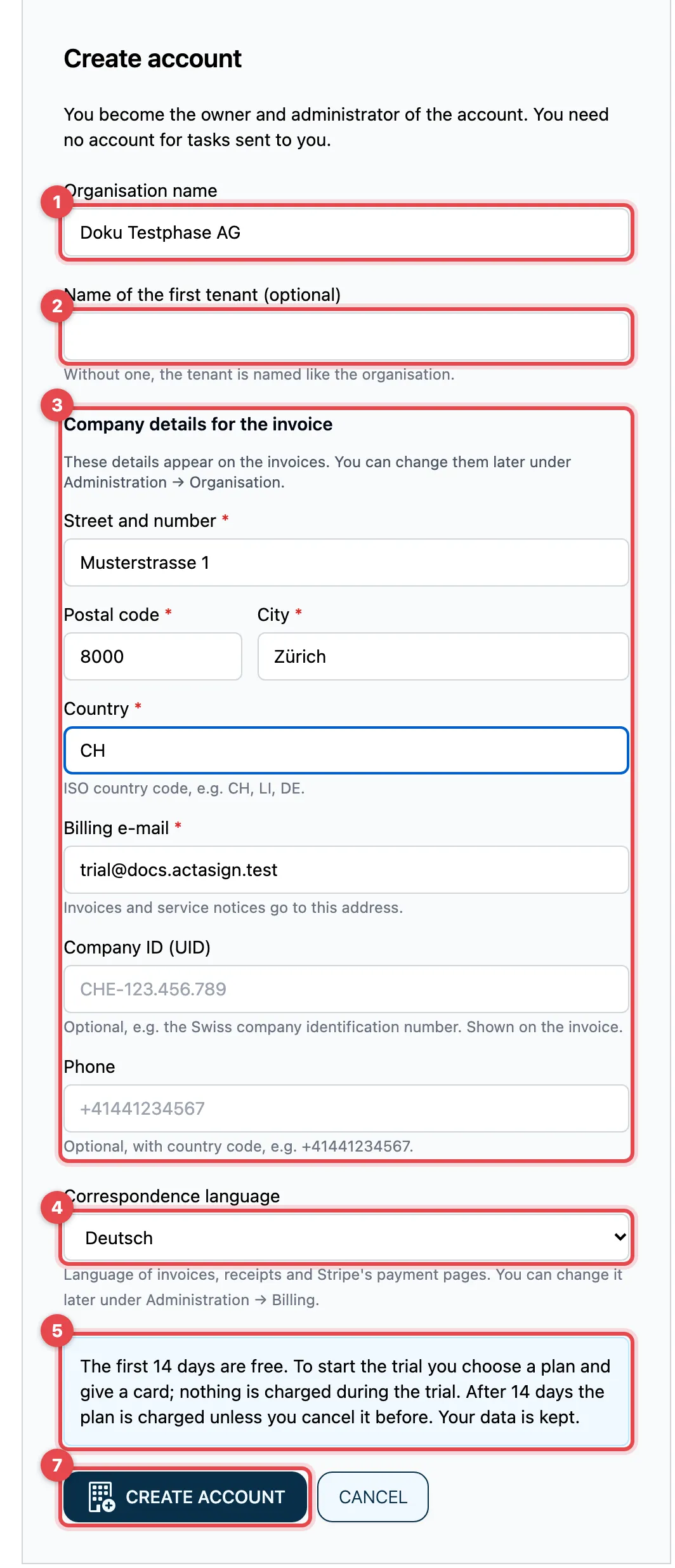
- Organisation name: the name of your company, at least 4 characters.
- Name of the first tenant (optional): your first organization in actaSIGN. If you leave it empty, it gets the same name as the account.
- Company details for the invoice: these details appear on the
invoices.
- Street and number, Postal code, City and Country are
required. Enter the country as a country code, e.g.
CH,LIorDE. - Billing e-mail: invoices and service notices go to this address. At first it shows your own address.
- Company ID (UID) (optional): e.g. the Swiss company identification
number
CHE-123.456.789. It then appears on the invoice. - Phone (optional): with the country code, e.g.
+41441234567.
- Street and number, Postal code, City and Country are
required. Enter the country as a country code, e.g.
- Correspondence language: Deutsch, Français, Italiano or English. Invoices, receipts and Stripe’s payment pages come in this language. At first it shows the language you are using actaSIGN in.
- Read the notice about the trial.
- Open Prices, Terms of use and General terms and tick the box to accept them. If you have already accepted the current version, this step is not shown.
- Click Create account.
actaSIGN creates the account, signs you in to it again and opens Administration → Billing. You change your company details later under Administration → Organisation, and the correspondence language under Administration → Billing.
3. Add a card and start the trial
Section titled “3. Add a card and start the trial”The trial does not run until a card has been added. Under Billing, the status says “Waiting for a card: the free trial starts once a card is given. Nothing new can be started until then.” A notice at the top of the administration reminds you of it.
- Under Start your free trial, choose Monthly or Yearly.
- Choose the plan you want to keep working with after the trial, and click Start trial on it. Stripe’s payment page opens.
- Enter your card and complete the step. Nothing is charged now.
- Stripe takes you back to actaSIGN. As soon as Stripe reports the card, the status says “Trial until …” and below it First payment on with the date on which the plan is charged for the first time.
The steps in Stripe are the same as when you choose a plan. During the trial you can change or cancel the plan through Manage plan, card and invoices.
What the trial includes
Section titled “What the trial includes”The trial lasts 14 days from the day the card is added and costs nothing. The limits of the smallest plan, Mini, apply, even if you chose a larger plan:
| During the trial | |
|---|---|
| People in the account | up to 3 (including you; invited people count too) |
| Tenants (organizations) | 1 |
| Qualified signatures (QES) | at most 5 |
| QES identification | not included |
| Features from the Team plan | not included, e.g. teams, AI assistance, webhooks |
You can try all signature types, templates, deputies and absences. Which areas of the administration need a larger plan is listed under Plans and features.

You see how many days are left at the top of Administration, e.g. “Trial: 12 days left (until 30 November 2026).” On the last day it says “Trial: today is the last day.”
Qualified signature in the trial
Section titled “Qualified signature in the trial”- If a person is not identified with Swisscom for the QES, they cannot sign with a QES during the trial. The message Qualified signature not possible says that a QES identification is not part of the trial. There is no link to get identified in that case.
- Once the 5 QES are used up, signing shows Trial QES allowance used up. More QES are only available with a plan.
- A request with QES tasks can then no longer be sent. See Plans and features.
After the trial
Section titled “After the trial”After 14 days Stripe charges the card for the chosen plan, unless you cancel before. From then on the limits and features of your plan apply. You change or cancel the plan under Choose a plan and billing.
If you have cancelled, or the payment does not go through:
- you and your members can still sign in,
- requests that were already sent keep running and can be completed,
- nobody can start a new request,
- all data is kept.
Then choose a plan again under Billing.
Accounts whose trial was already running before the card rule keep their trial without a card. There, choose a plan before it ends; otherwise the top of Administration says “The trial has ended. Choose a plan to keep starting new work.”
Good to know
Section titled “Good to know”- You do not need your own account for tasks that are sent to you.
- “Your e-mail domain already belongs to an organisation in actaSIGN”: your company has confirmed its domain. Ask its administrator to invite you.
- “You have reached the maximum number of own accounts”: the number of own accounts per person is limited. Contact support.
- None of this applies to customers who are billed by contract. They have no trial and no limits.