

Set the document of a form template
A form template can bring the document along, or only the fields. Here you decide what happens when a request is started, and add more documents or enclosures.
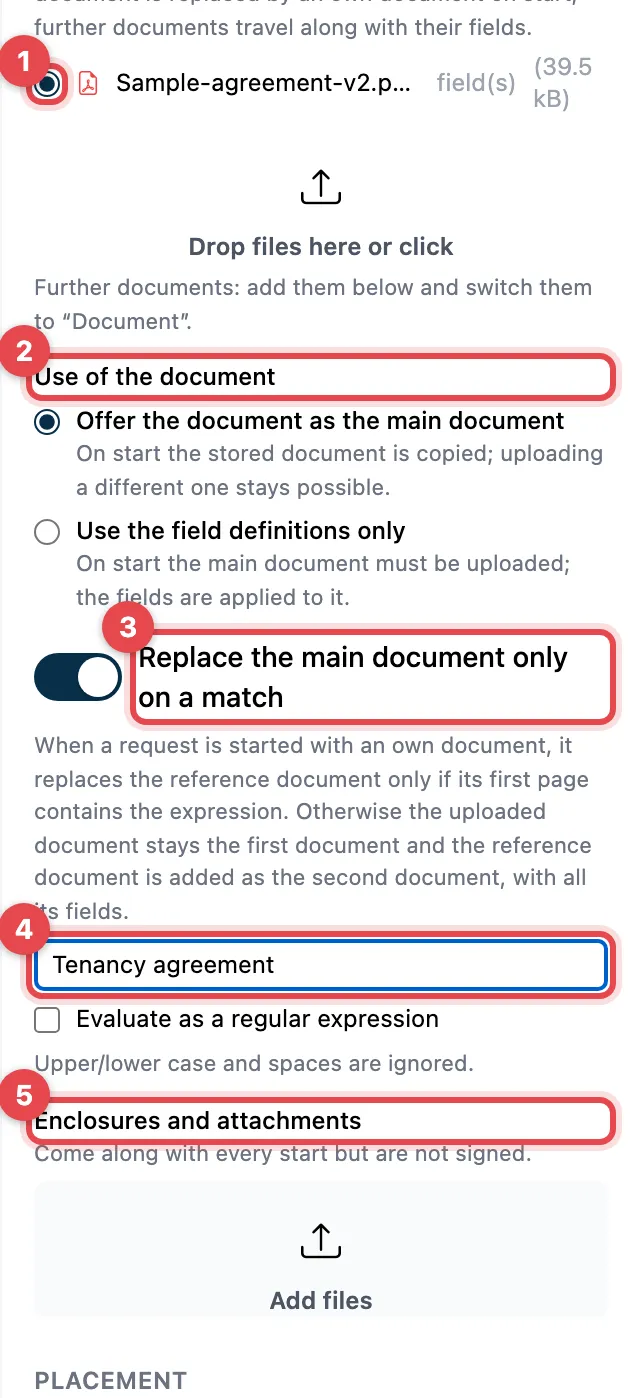
- The selected round button in front of a document marks the reference document (note Reference). The fields are placed on it; when a request is started, it can be replaced by an own document. Use the button to pick another document as the reference document.
- Use of the document:
- Offer the document as the main document: when a request is started, the stored document is copied; an own document is still possible.
- Use the field definitions only: when a request is started, someone must upload the document; the fields are applied to it.
- Replace the main document only on a match: an own document only replaces the reference document if a certain text appears on its first page. This way the fields do not end up on the wrong form.
- In the field below (Expression on the first page), enter this text, for example “Personnel master sheet”. Upper and lower case and spaces do not count.
- Enclosures and attachments: files that come along with every request but are not signed.
Several documents
Section titled “Several documents”Every document can carry fields. Upload more documents under Enclosures and attachments and set them to Document (to sign) in the drop-down list. Other options are Attachment (PDF, view only) and Enclosure (any file type).
Good to know
Section titled “Good to know”- The reference document must be a PDF. Enclosures may be any file type.
- Replace the main document only on a match is only available with Offer the document as the main document.
- Evaluate as a regular expression is meant for search patterns; plain text is usually enough.
- With Remove document you take an additional document out again.