

Set the composer pre-selection
The composer is the assistant members use to create a new request. Here you set what is already pre-selected in it: subject, recipients, signature type and the settings of each new task.
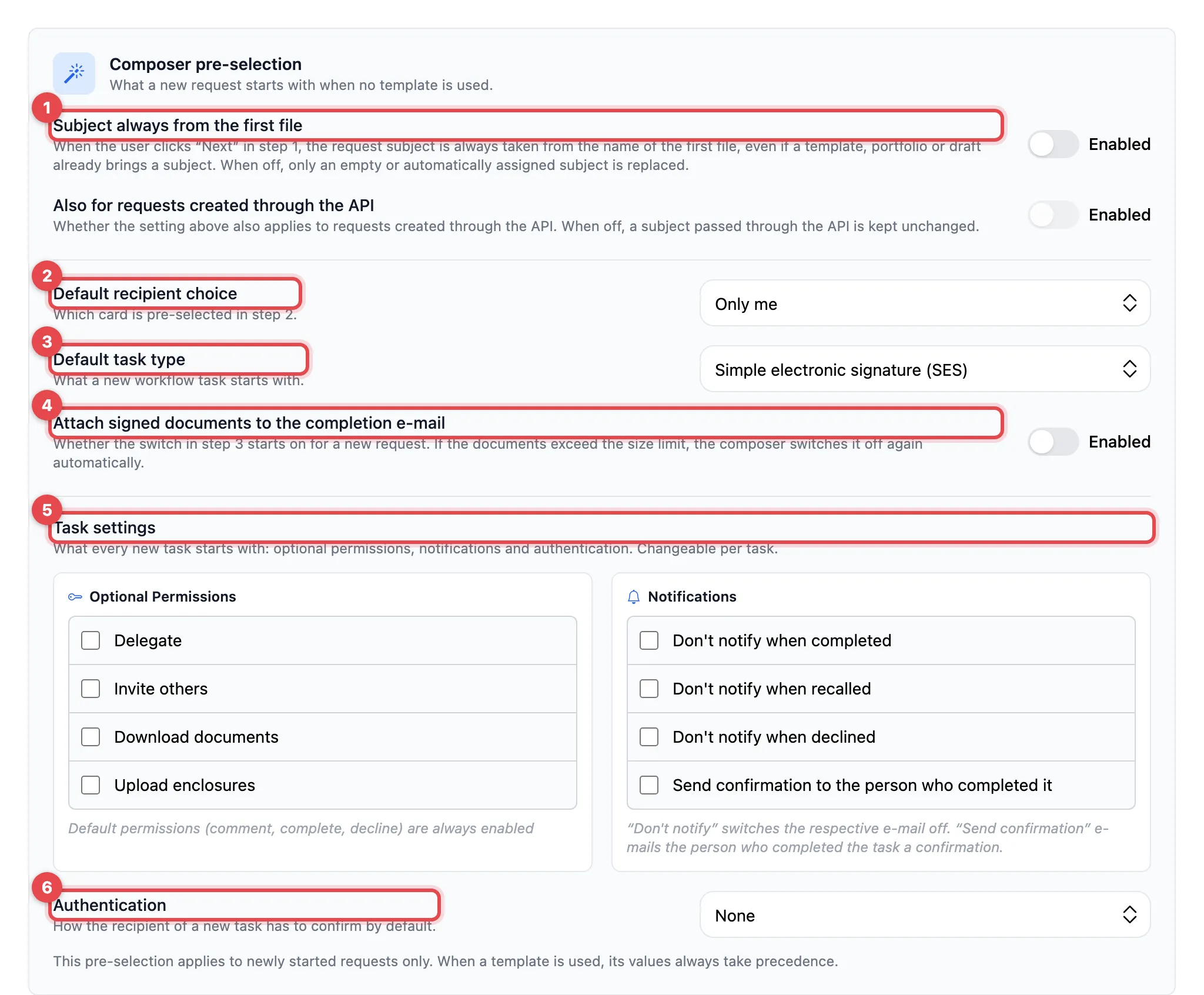
- Subject always from the first file and Also for requests created through the API
- Default recipient choice (and, with Other people, Starting point)
- Default task type
- Attach signed documents to the completion e-mail
- Task settings: Optional Permissions and Notifications
- Authentication
Change the values and click Save at the bottom of the page. The pre-selection only applies to newly started requests. If a template is used, its values always apply.
Subject and recipients
Section titled “Subject and recipients”| Setting | What it does | Default |
|---|---|---|
| Subject always from the first file | When you click Next in step 1, the subject is always taken from the name of the first file, even if a template, a portfolio or a draft already has a subject. When switched off, actaSIGN only replaces an empty or automatically assigned subject. | off |
| Also for requests created through the API | The same for requests that another system creates through the API. Only available when the switch above it is on. | off |
| Default recipient choice | Which card is pre-selected in step 2: Only me, Other people or No pre-selection | Only me |
| Starting point | Only with Other people: whether step 2 first shows Process templates or Form templates | Process templates |
Signature and completion
Section titled “Signature and completion”| Setting | What it does | Default |
|---|---|---|
| Default task type | What a new task starts with: Simple electronic signature (SES), Advanced electronic signature (AES), Qualified electronic signature (QES-CH) or Qualified electronic signature (QES-EU) | SES |
| Attach signed documents to the completion e-mail | Whether this switch is on in step 3. If the documents are too large, the composer switches it off again itself. | off |
Task settings
Section titled “Task settings”What each new task starts with. Senders can change it for each task.
| Setting | What it does | Default |
|---|---|---|
| Optional Permissions | Granted in advance: Delegate, Invite others, Download documents, Upload enclosures | none |
| Notifications | Don’t notify when completed, Don’t notify when recalled, Don’t notify when declined suppress the e-mail in question; Send confirmation to the person who completed it sends the person a confirmation after they complete the task | none |
| Authentication | How the recipient must confirm: None, OTP via SMS, Password, Login required or Authenticator app / Passkey | None |
Good to know
Section titled “Good to know”- Every task always has the standard permissions (comment, complete, decline).
- Whether senders may grant the Fill in fields permission at all is set under Recipient permissions.
- OTP via SMS needs a mobile number of the recipient.