

Choose a plan and billing
Under Billing you see your account’s plan, the trial and how much you have used so far. This is where you start the trial with a card, choose a plan, and reach invoices and payment details.
Plan and status
Section titled “Plan and status”
-
Plan: the chosen plan and whether you pay monthly or yearly. If it says No plan yet, no card has been added yet, or the account still has an older trial without a card (as in the picture).
-
Status, for example:
Status Meaning Waiting for a card: … The account is new. The trial only starts once a card is added, see Add a card. Until then nobody can start anything new. Trial until … The 14 days are still running. This card was already used for a free trial. … There is no trial with this card. Choose a plan; it is paid straight away. Active The plan is paid. Payment due — Stripe is retrying A payment did not go through. Stripe tries again by itself. Locked: payment missing. Nothing new can be started. The payment is missing. Nobody can start new requests. Cancelled. Nothing new can be started. The plan has ended. Below it you see First payment on (during the trial), Renews on or, after a cancellation, Ends on.
-
Correspondence language: see below.
-
Manage plan, card and invoices: appears as soon as you have a plan. See Invoices and card.
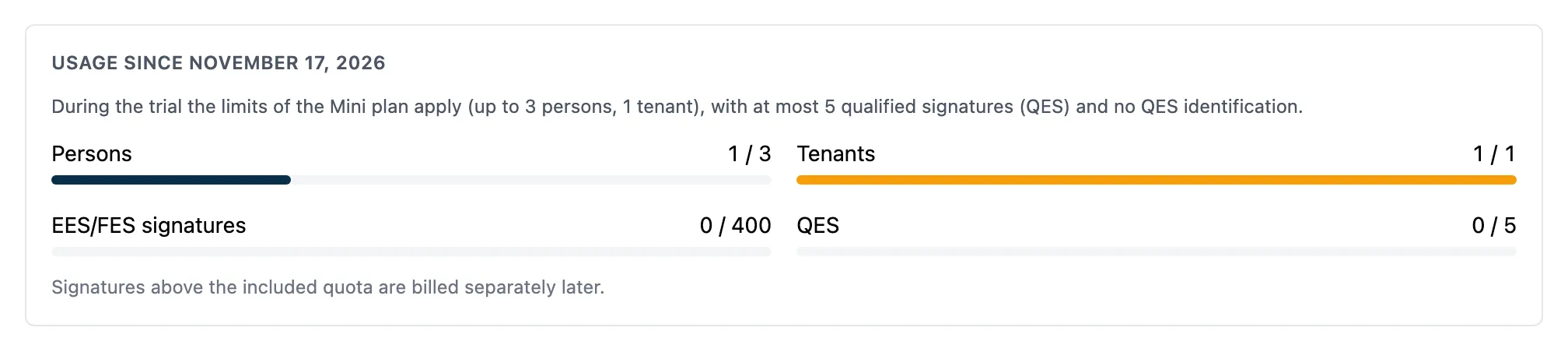
Under Usage since … you see how many Persons, Tenants, EES/FES signatures and QES your account has or has used, and next to it the limit of your plan. The bar turns yellow at 80 % and red once the limit is exceeded. (EES/FES is the app’s abbreviation for simple and advanced electronic signatures, SES/AES.)
During the trial the limits of the Mini plan apply (up to 3 people, 1 tenant), with at most 5 qualified signatures (QES) and no QES identification. Signatures above the included quota are billed separately later.
Choose a plan
Section titled “Choose a plan”For a new account this section is called Start your free trial and the button is Start trial. In Stripe you then only enter your card; it is charged only after 14 days. See Add a card and start the trial. The picture shows the section as it looks after a trial or a cancellation.
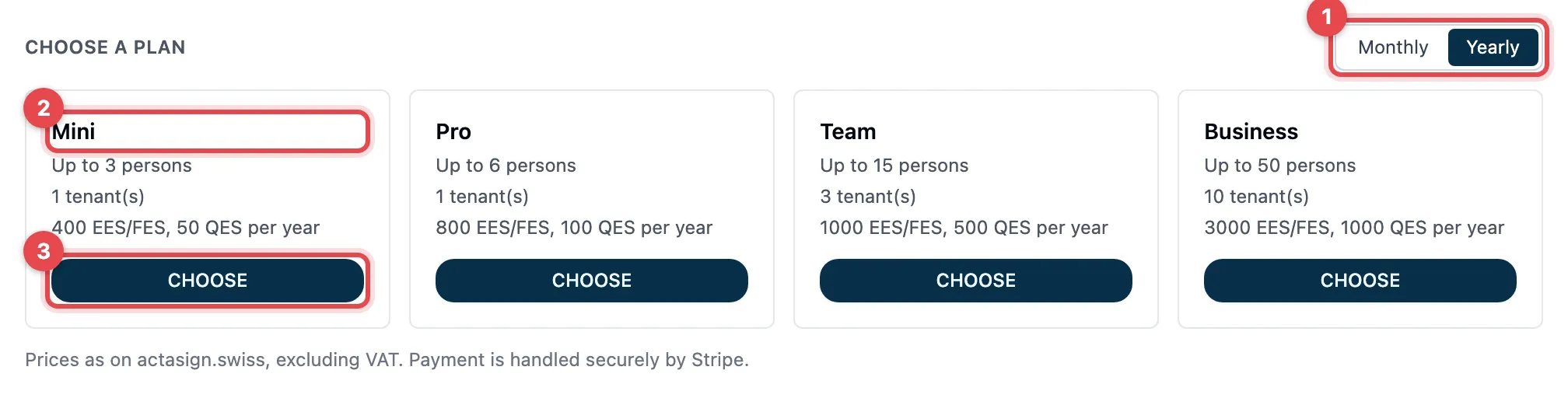
- Choose Monthly or Yearly at the top right.
- Each card shows one plan: how many people, tenants and signatures per year it includes. The prices are on actasign.swiss, excluding VAT.
- Click Choose on the plan you want. Stripe’s payment page opens.
- Enter your payment details there and complete the payment.
- Stripe takes you back to actaSIGN. You see “Thank you! The payment is being confirmed …”. As soon as Stripe reports the payment, the page shows your plan.
What each plan includes is listed under Plans and features.
When a plan cannot be chosen
Section titled “When a plan cannot be chosen”- “Too small for the current number of persons or tenants.”: your account already has more people or tenants than the plan allows. Choose a larger plan or first remove people or tenants.
- “Payment through Stripe is not set up on this deployment yet.”: contact support.
- If you already have a plan, Choose a plan is missing. You then change the plan through Manage plan, card and invoices.
Invoices, card and cancellation
Section titled “Invoices, card and cancellation”Manage plan, card and invoices opens Stripe’s customer portal. There you
- change the plan,
- change your card,
- download invoices and receipts,
- cancel the plan. It runs until the end of the paid period; after that nobody can start anything new.
Invoices are also sent to your organization’s Billing e-mail. You change the address, UID and billing e-mail under Administration → Organisation. actaSIGN passes the changes on to Stripe.
Correspondence language
Section titled “Correspondence language”- Under Correspondence language, choose Deutsch, Français, Italiano or English.
- The choice is saved at once. You see Saved.
Invoices, receipts and their e-mails, and Stripe’s payment pages come in this language. The language applies to invoices from now on; invoices that were already issued stay as they are. If it says Not chosen, no language was chosen when the account was opened.
Good to know
Section titled “Good to know”- Without a card on a new account, with a missing payment or after a cancellation, everyone can still sign in and complete running requests. New requests cannot be started. All data is kept.
- Limits apply to the whole account, across all tenants. All members count as people, invited ones too, except blocked ones.
- Sections your plan does not include show the note “From Team” or “From Business” in the administration. See Plans and features.